Author: Hasan Abdullah, Esq.
Updated: The 21st of August 2026.
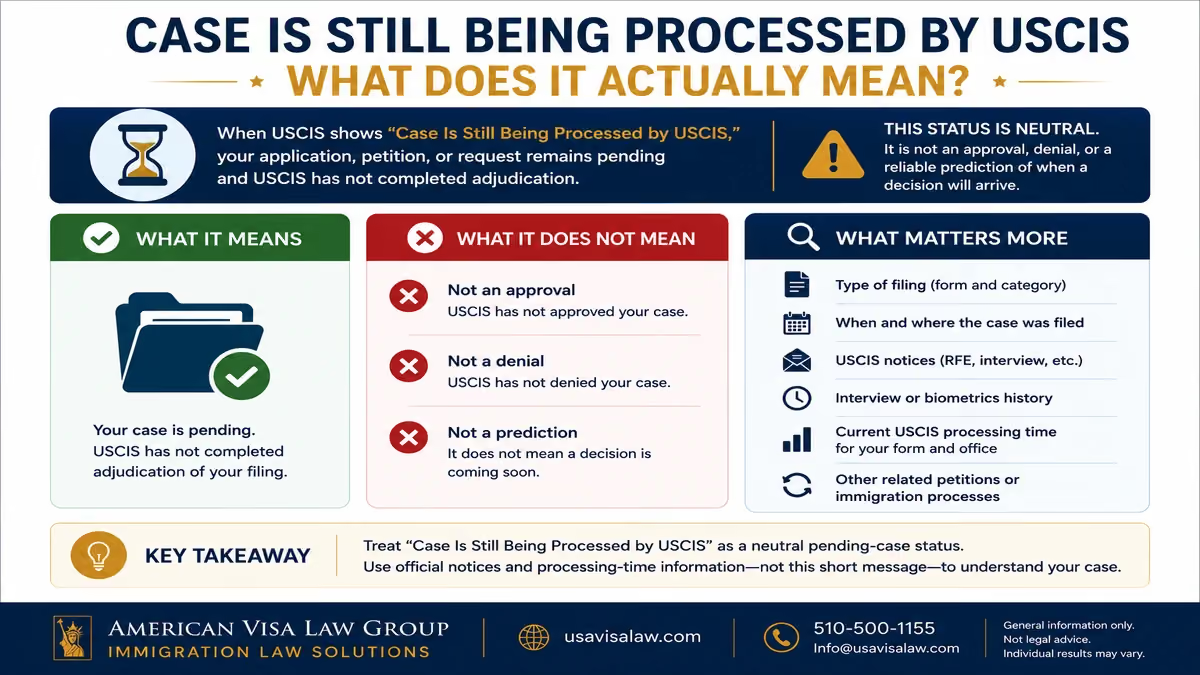
Seeing “Case Is Still Being Processed by USCIS” can be frustrating, especially when the message remains unchanged for weeks or months. In most cases, it simply means USCIS has not completed adjudication of your application or petition. The status is not an approval, denial, or reliable prediction of when a decision will arrive.
What matters more is the type of filing, when and where it was submitted, whether USCIS has requested additional evidence or an interview, and how the case compares with current processing expectations. Applicants navigating a pending matter can also review AVLG’s immigration legal services for guidance related to their specific immigration category.
This guide explains what common USCIS case-status messages actually mean, how to track your case correctly, when a lack of movement may deserve attention, and what practical steps to take while you wait.
“Case Is Still Being Processed by USCIS” generally means your application, petition, or request remains pending and USCIS has not completed adjudication. The message does not indicate that approval or denial is imminent. Your filing date, case type, USCIS notices, and applicable processing time provide more useful context.
If USCIS says your case is still being processed, the most important takeaway is straightforward: your application, petition, or request remains pending, and USCIS has not yet completed adjudication.
The message itself does not tell you exactly what is happening inside USCIS at that moment. A pending case may still be moving through normal adjudication steps, waiting for additional review, or progressing through processes that are not fully reflected in the public-facing status message.
You can verify the latest public update using the official USCIS Case Status Online, which allows applicants and petitioners to check a case using the USCIS receipt number.
Generally, it is best understood as a neutral pending-case message.
By itself, the status does not indicate whether USCIS is leaning toward approval or denial. A case can remain pending for many routine reasons, and processing varies based on the immigration benefit, the office handling the case, and whether additional steps are required.
More useful questions include:
If USCIS needs something from you, the actual written notice is more important than trying to interpret a short online status message.
Applicants should also preserve their Form I-797 receipt notices and review any electronic documents available through their USCIS online account.
No. “Case Is Still Being Processed” does not reliably predict when USCIS will issue a decision.
The next action could be an approval, but it could also involve an interview, Request for Evidence, transfer, continued processing, or another case-specific step.
One of the most common mistakes is assuming that a particular status message creates a countdown to approval. USCIS does not provide a universal decision timeline tied to the phrase “still being processed.”
Instead, compare your case with the official USCIS processing times for the relevant form and office. Processing-time information provides much more useful context than the wording of the status alone.
If the case eventually falls outside USCIS’s expected processing range, the agency also provides an official case inquiry and e-Request system for certain situations.
For now, the status is best treated as confirmation that the case remains pending. The next step is to make sure you are checking the correct USCIS information—and understand how the different tracking tools fit together.
The fastest way to confirm the latest public update on a pending application or petition is through the official USCIS Case Status Online tool.
To use it, you need the 13-character receipt number USCIS assigned to the case. USCIS explains that the receipt number consists of three letters followed by 10 numbers, such as EAC1234567890, and that dashes should be omitted when entering it online.
The receipt number usually appears on a USCIS notice of action, such as Form I-797 or I-797C.
Once entered, Case Status Online displays the most recent status USCIS has made available for that case. It is useful for quickly checking whether USCIS has recorded an action such as receipt of the filing, biometrics, a Request for Evidence, interview scheduling, approval, or card production.
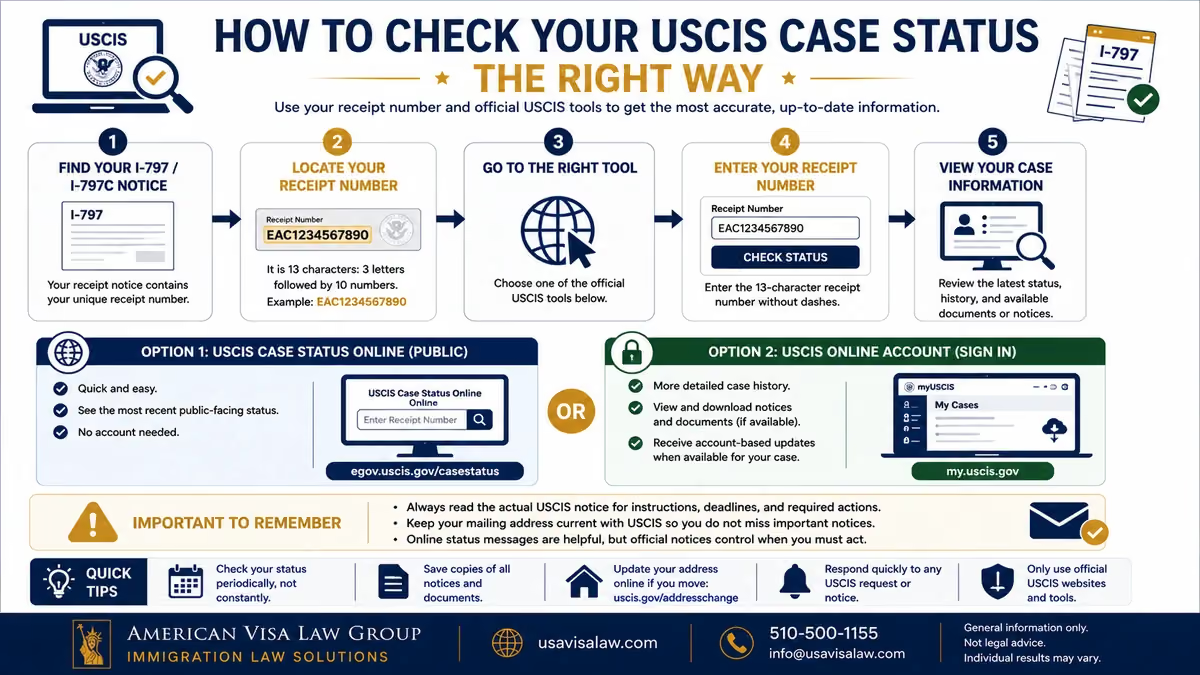
USCIS provides two related tools, but they are not exactly the same.
Case Status Online is the simpler option. You enter the receipt number and view the current public-facing status without needing to create an account.
A USCIS online account can provide a more detailed case-management experience. Depending on how the case was filed and the account features available for that filing, applicants may be able to review case history, access electronic notices or documents, and receive account-based updates. USCIS online-filing materials show case cards that can include separate Case Status, Case History, and Documents tabs.
For some online filings, USCIS also posts documents such as receipt notices, biometrics notices, Requests for Evidence, and decision letters to the account while continuing to mail notices to the address on file.
The online status is useful, but the actual USCIS notice controls when the agency asks you to take action.
For example, if the status says an RFE was issued, the applicant should read the RFE itself for the evidence requested and the response deadline. Similarly, an interview status should be followed by reviewing the appointment notice for the date, location, and instructions.
Keeping the mailing address current is therefore important even when you regularly check the case online. USCIS specifically encourages applicants to update their address so that correspondence and immigration documents are not delayed or missed.
A good practice is to use the online system to monitor the case, while treating USCIS notices and documents as the authoritative source for any action you need to take.
The next source of confusion is the difference between a case that is simply “still being processed” and one USCIS describes as “being actively reviewed.”
The two USCIS status messages sound similar, but they should not be interpreted in exactly the same way.
“Case Is Still Being Processed by USCIS” is a broad pending-case message. It confirms that USCIS has not finished adjudicating the filing, but the wording itself does not indicate a particular review stage or suggest that a decision is close.
“Case Is Being Actively Reviewed by USCIS” is a specific USCIS case-status message that can appear in an applicant’s case history. USCIS materials show this status appearing alongside other milestones such as receipt of the filing and biometrics scheduling.
In practical terms:
The phrase “actively reviewed” can sound as though an officer is continuously working on the file. That is too strong an interpretation. USCIS case-status messages do not provide a complete view of every internal adjudication step, and a case can remain in active review for a meaningful period before another action occurs.
Possible next steps after either status can include continued processing, a Request for Evidence, interview scheduling, approval, or another case-specific action.
Applicants who want a deeper explanation of that particular message can read AVLG’s dedicated guide on what “Case Is Being Actively Reviewed by USCIS” means, including what may happen next and how to monitor the case.
The key point is not to treat either phrase as a prediction. The status tells you the case is pending or under review; it does not tell you when USCIS will decide it.
USCIS uses different status messages as a case moves through processing. Some simply confirm that a step has occurred, while others indicate that USCIS needs something from you.
The wording can vary depending on the form and case type, so the status should always be read together with any notice USCIS sends.
Applicants can verify their latest message through the official USCIS Case Status Online.
This status generally means USCIS has applied biometrics to the case. Fingerprints and other biometric information may be used for identity verification and required background or security checks.
For most applicants, the important point is what this status does not mean: it does not establish that the substantive immigration case has been approved or that a decision will follow within a particular number of days.
Unless USCIS issues another notice requiring action, the applicant generally continues monitoring the case.
A Request for Evidence (RFE) deserves more attention because USCIS is asking for additional evidence before it can complete adjudication.
Do not rely solely on the online message. The written RFE identifies:
USCIS confirms through its missing-notice and e-Request guidance that applicants may receive notices involving RFEs, biometrics appointments, interviews, or final decisions while a case is pending.
Missing an RFE response deadline can have significant consequences, so the actual notice should be reviewed promptly.
If the status later changes to “Response to USCIS Request for Evidence Was Received,” that generally confirms USCIS recorded the response. It does not mean approval automatically follows.
When USCIS schedules an interview, the appointment notice—not merely the online status—provides the information you need.
Review it for the:
The significance of the interview depends heavily on the underlying filing. An N-400 naturalization interview, for example, serves a different purpose from an I-485 adjustment-of-status interview.
Approval is an important milestone, but it does not mean the same thing for every USCIS form.
An approved I-130 or I-140 petition may establish an underlying immigrant classification while additional steps remain before permanent residence. An approved Form I-485, by contrast, generally represents approval of adjustment to permanent resident status.
Similarly, approval of an application that results in an immigration document may be followed by card or document production.
If the online status indicates that a card was mailed, USCIS advises applicants to use the available USPS tracking information and provides a non-delivery inquiry process when an expected card does not arrive.
The broader lesson is simple: read each USCIS status in the context of the specific form you filed. The same word—especially “approved”—can represent very different stages of the overall immigration process.
There is no universal maximum amount of time that a USCIS case can remain under the same online status. One applicant may see a new update within days or weeks, while another case can remain unchanged for months.
The timing depends much more on the underlying application or petition than on the wording of the status itself. Factors can include the form type, USCIS workload, the office handling the case, whether additional evidence is required, interview scheduling, and the time needed to complete other adjudication steps.
That is why a case showing “still being processed” for several months does not automatically mean something is wrong.
The more useful comparison is the official USCIS Case Processing Times for the relevant form, category, and office.
USCIS explains that the processing time displayed on its website generally represents how long it took the agency to complete 80% of adjudicated cases during the previous six months.
That distinction is important.
If USCIS displays a processing time of 12 months, it does not mean:
Some cases are completed sooner, while others fall within the slower portion of the workload.
USCIS also explains that processing can be affected by factors such as filing volume, workload and staffing allocations, how long an applicant takes to respond to a request for additional information, and operational or policy changes. You can read USCIS's explanation of how case processing times are calculated.
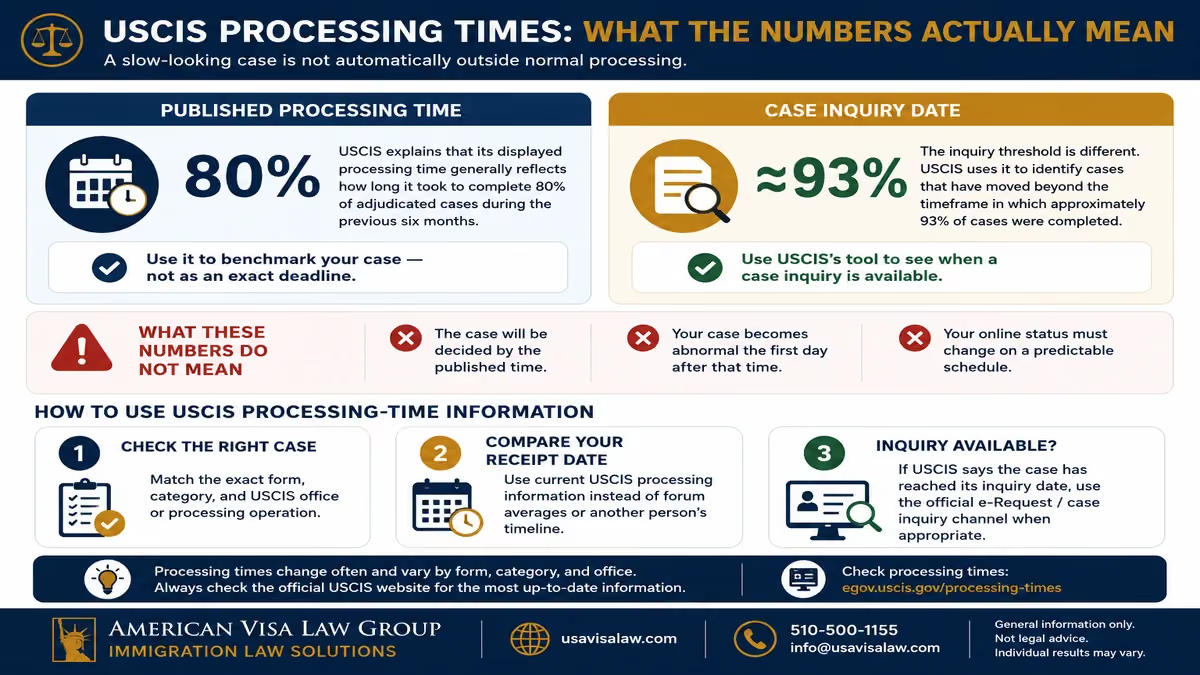
When reviewing processing times, compare the case with the correct:
Do not simply search online for an average processing time for “green cards” or “USCIS cases.” An I-130, I-485, I-765, I-140, or N-400 may follow very different timelines.
USCIS also notes that some cases associated with the National Benefits Center should be compared with the applicable local field office, depending on the form and type of case.
The key question is therefore not “How long has my online status stayed the same?” but rather “How does my actual case compare with USCIS's current processing information for this type of filing?”
If the case has moved beyond the point at which USCIS permits an inquiry, that is when additional follow-up may become appropriate. The next section explains how to determine whether your case is actually taking longer than expected and what steps to take.
A USCIS case that feels slow is not necessarily outside normal processing. Before taking additional action, compare the case with the current processing information for the exact form, category, and USCIS office involved.
USCIS provides an official Case Processing Times tool for this purpose. The agency updates its processing-time information monthly and uses the filing date, form type, category, and applicable office to help determine when a case may be eligible for an inquiry.
Start with the receipt notice and identify the:
For some forms, USCIS now reports processing under Service Center Operations (SCOPS) rather than a specific service center. For certain Form I-485, N-400, and N-600 cases initially associated with the National Benefits Center, USCIS instructs applicants to use the relevant local field office when checking processing times.
This is more reliable than comparing your case with another applicant's timeline on a forum or social-media group.
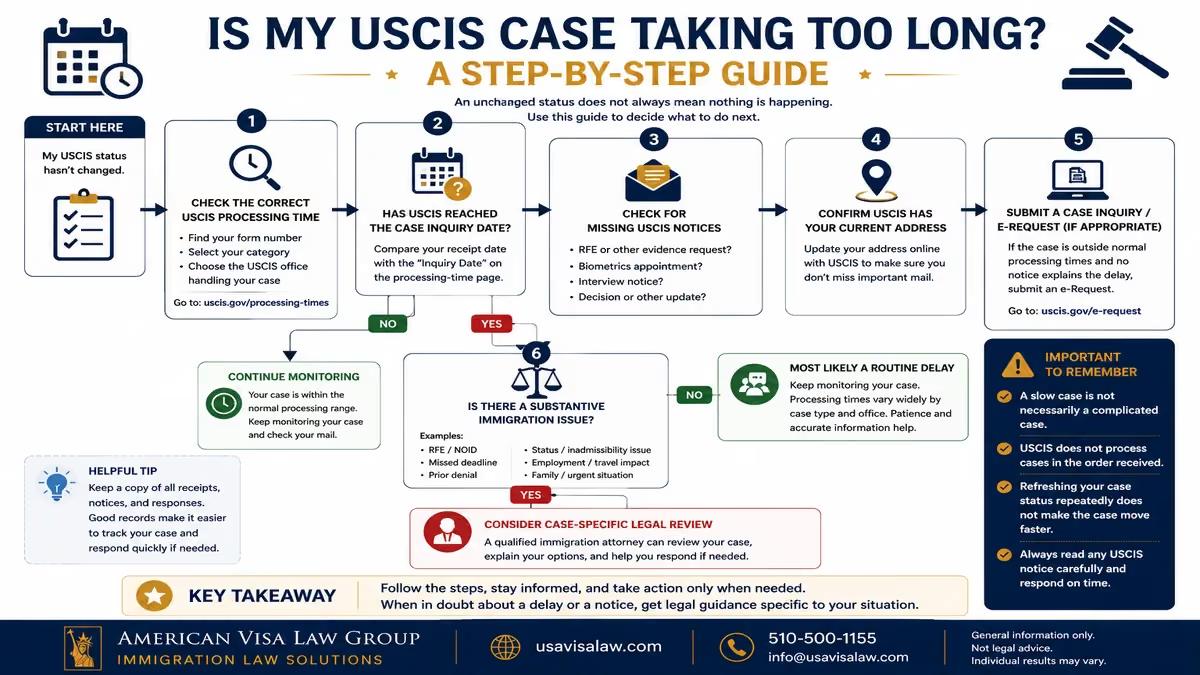
If the case appears to be taking longer than expected, use USCIS's processing-time tool to determine whether the filing has reached its case inquiry date.
USCIS explains that its inquiry threshold is different from the standard processing-time figure. The inquiry calculation is designed to identify cases that have moved beyond the timeframe in which approximately 93% of adjudicated cases were completed.
When USCIS indicates that an inquiry is available, applicants can use the official USCIS e-Request system to ask about a case taking longer than expected.
Submitting repeated inquiries while the case remains within the normal range generally does not create a faster adjudication process.
Before assuming the problem is simply delay, check whether USCIS has issued something that requires action.
This could include:
If the online case history indicates that USCIS mailed a notice but you did not receive it, the agency's e-Request system also includes an option for reporting a missing notice.
This is especially important when a deadline may be running. A pending online status does not replace the need to respond to an actual USCIS notice.
A case can appear stalled when the real problem is that correspondence was sent to an old address.
USCIS strongly encourages applicants with pending cases to use its Change of Address process after moving. The agency also warns that changing an address with the U.S. Postal Service does not update the address USCIS has on file, and USPS generally does not forward USCIS mail.
For most applicants, USCIS allows the address to be updated through an online account even when the original immigration filing was submitted by mail.
Some cases deserve closer review even when the online status itself provides little information.
Examples can include:
In those situations, the real question may not be simply “Why hasn't my status changed?” It may be whether something in the filing history or procedural posture needs attention.
A case that has not changed online is therefore not automatically delayed. First compare it with USCIS's current processing information, confirm that no notice or deadline has been missed, and determine whether USCIS's own tools show that a case inquiry is available.
If those checks reveal an unusual issue, the next step should be based on the actual case history rather than repeatedly refreshing the online status.
If your USCIS case remains pending but is still within the expected processing range, the best approach is usually to monitor the case, protect your deadlines, and avoid unnecessary assumptions about what the online status means.
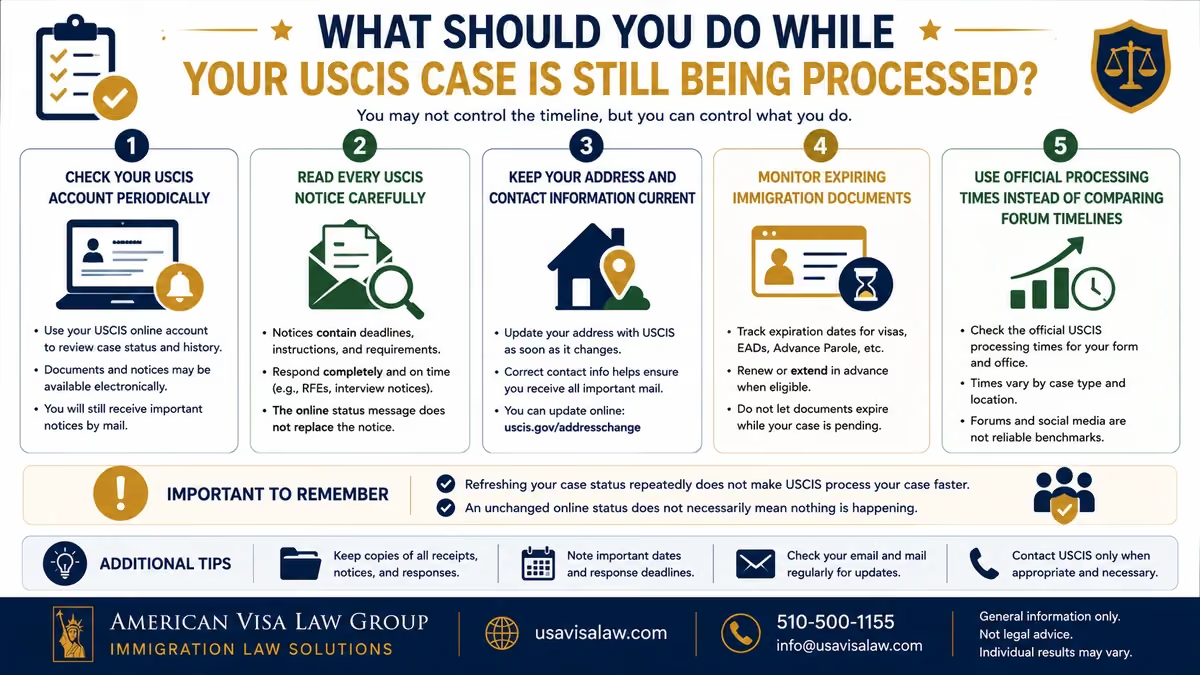
Use USCIS Case Status Online or your USCIS online account to monitor meaningful changes.
There is generally little value in refreshing the status repeatedly throughout the day. An online update does not make the underlying case move faster, and the absence of a new status does not necessarily mean processing has stopped.
If USCIS sends a:
read the actual document rather than relying only on the short status displayed online.
Written notices contain the deadlines, locations, evidence requirements, and other instructions that matter for the case.
If you move while a case is pending, update USCIS promptly through the official USCIS Change of Address process.
This is particularly important because important notices may still be sent by mail even when you also have an online account.
Depending on the case, a pending USCIS application does not automatically preserve every separate immigration benefit or document.
Pay attention to the expiration of items such as:
Whether a renewal, extension, or separate filing is necessary depends on the underlying immigration category.
Online forums and case-tracking communities can provide useful anecdotal context, but another applicant's timeline is not a reliable prediction for your case.
Two filings submitted on the same day can move differently because of the form type, office, evidence, background checks, interview requirements, or other case-specific factors.
For a more useful benchmark, compare your case with official USCIS processing-time information rather than assuming that someone else's approval means yours should arrive next.
Most importantly, respond promptly when USCIS actually requests something. If the case remains within ordinary processing expectations and no notice requires action, continued processing is often exactly that: continued processing—not evidence that the case has been forgotten.
USCIS does not publish a guaranteed schedule for when an individual case status will update. A status may change when USCIS records a meaningful action on the case, but applicants should not expect a new message every day, every week, or after a fixed number of days.
The official USCIS Case Status Online tool shows the current public-facing status associated with a receipt number. For applicants using a USCIS online account, the Case Status tab generally displays the same current status that appears through Case Status Online, while additional tabs may show case history or documents when those features are available.
Not necessarily.
The online status is best understood as a case-tracking summary, not a complete record of every internal step USCIS may take while adjudicating a filing. A case can therefore remain under the same public status while processing continues.
This is why an unchanged message should be evaluated alongside more useful information, including:
Applicants with online accounts may also have access to a Case History or Documents tab. For eligible online filings, USCIS states that documents such as receipt notices, biometrics notices, Requests for Evidence, and decision letters may appear in the account.
There is generally no advantage to checking the case repeatedly throughout the day. Refreshing Case Status Online does not affect how quickly USCIS adjudicates the filing.
A more practical approach is to check periodically, monitor email or text notifications if enabled, and pay close attention to actual USCIS notices.
If the status remains unchanged long enough that the case moves beyond USCIS's expected processing range, use the agency's case inquiry tools rather than trying to interpret the absence of an online update.
The key point is simple: an unchanged USCIS case status does not, by itself, prove that a case has stopped moving or that something has gone wrong.
A USCIS case remaining pending for a long time does not automatically mean that legal intervention is necessary. Many applications and petitions simply take time to adjudicate, particularly when they remain within USCIS's normal processing range.
Legal review becomes more useful when the delay is accompanied by a case-specific issue, missed deadline, conflicting notice, or immigration consequence that cannot be understood from the online status alone.
Consider speaking with an immigration attorney if:
The important distinction is between a slow case and a complicated case. A status that has not changed for several months may still be routine. But when the filing history contains a substantive immigration issue, simply waiting for another online update may not answer the underlying legal question.
Applicants can first compare the case against official USCIS processing times and determine whether the agency's case inquiry system is available before deciding whether additional review is warranted.
A meaningful review should focus on the complete USCIS record rather than a screenshot of the latest status alone.
When available, gather:
These documents can help determine whether the case is simply awaiting adjudication or whether another legal or procedural issue deserves attention.
For readers evaluating the cost of professional assistance, AVLG publishes information about immigration attorney costs for different types of immigration matters.
If your case has remained pending beyond expected processing, involves an unresolved USCIS notice, or presents another case-specific complication, you can speak with an immigration attorney at American Visa Law Group to review the filing history and determine what next steps may be appropriate.
The goal is not to treat every delayed USCIS case as a legal emergency. It is to recognize when the online status no longer provides enough information to make a sound immigration decision.
If your case is still being processed by USCIS, the message generally means the filing remains pending and USCIS has not completed adjudication. It does not reliably predict approval, denial, or how soon the next update will occur.
The most useful next steps are to monitor your official USCIS account, read every written notice carefully, compare the case with the correct USCIS processing time, and confirm that your address and contact information remain current.
An unchanged status is not automatically evidence of a problem. If the case moves beyond USCIS’s expected processing range, involves an unresolved RFE or NOID, or creates another immigration complication, a case-specific review may be more useful than trying to interpret the status message alone.
It generally means your application, petition, or request remains pending and USCIS has not completed adjudication. The message does not indicate whether approval or denial is imminent. Check the latest update through USCIS Case Status Online and compare the filing with the appropriate USCIS processing information.
It is best viewed as a neutral pending-case status. It confirms that USCIS has not issued a final decision reflected in the online case record, but it does not indicate that USCIS is leaning toward approval or denial. Written notices, filing history, processing times, and any pending requests from USCIS provide more useful context.
There is no single maximum period that applies to every USCIS case. Processing varies by form, category, office, workload, evidence, interviews, and other case-specific factors. USCIS explains that its published processing times generally show how long it took to complete 80% of adjudicated cases during the previous six months.
Both indicate that the case remains pending, but “Case Is Being Actively Reviewed by USCIS” is a specific case-status message associated with a review-related case event. Neither phrase guarantees that a decision will come soon. For a deeper explanation, see AVLG’s guide to what “Case Is Being Actively Reviewed by USCIS” means.
This generally means USCIS has associated your biometrics with the pending case. It does not mean the underlying immigration benefit has been approved or that approval will occur within a particular number of days. Unless USCIS sends another notice requiring action, applicants generally continue monitoring their case and correspondence.
USCIS does not publish a guaranteed schedule for when an individual case status will change. The online system displays the current public-facing status when relevant case information is posted. An unchanged status should therefore be considered alongside USCIS notices and the applicable case processing time, rather than treated as evidence that nothing is happening.
USCIS does not publish a reliable weekday-versus-weekend schedule that applicants can use to predict case-status changes. A status or online notification should not be interpreted differently simply because it appears on a Saturday, Sunday, or weekday. The timing of an online update does not itself indicate whether approval is more or less likely.
First use the USCIS processing-time tool to determine whether your case has reached the agency’s inquiry threshold. USCIS calculates the case inquiry date using the time needed to complete approximately 93% of adjudicated cases. If the tool indicates that an inquiry is available, you can use the official USCIS e-Request system to request an update.
For readers who want to track a pending USCIS case, understand processing times, or determine when additional follow-up may be appropriate, these official resources provide useful next steps:

Hasan Abdullah, Esq. is the Founder and Managing Attorney of American Visa Law Group. His practice focuses on U.S. immigration law, including family-based immigration, employment-based immigration, adjustment of status, consular processing, waivers, PERM labor certification, NIW, EB-1, H-1B, O-1, and complex immigration strategy.
Through AVLG Mr. Abdullah helps individuals, families, professionals, investors, and employers understand their immigration options and plan around changing government policies, USCIS procedures, and Visa Bulletin movement. His work emphasizes practical legal analysis, realistic expectations, and strategy tailored to each applicant’s immigration history and long-term goals.


